First, the diagnosis
Not every listing that doesn’t sell has the same problem. Look at where it gets stuck:
- Very few views: people can’t find your listing. It’s a visibility problem (causes 1 to 4).
- Views, but no favourites: people see it, but it doesn’t appeal. It’s an appeal problem (causes 4 to 7).
- Favourites, but no sale: people are hesitating. Skip straight to the end of this guide.
1. It’s too old
This is the number one cause, and the most unfair: there’s nothing wrong with your listing, it has just been covered by the thousands of listings posted since. After a few weeks, it barely shows up for buyers sorting by “Newest first”.
The fix: put it back at the top by reposting it. The three ways to do it are in How to bump your Vinted listings.
2. Some fields were left empty
Buyers filter: by size, by brand, by colour, by condition. A listing without a brand doesn’t show up when someone filters on that brand. A listing without a size disappears for everyone who has set theirs. It’s mechanical.
The fix: fill in every field, even the ones that seem minor, like colour and material. Each field filled in is one more filter that lets your listing through.
3. The title doesn’t say what people search for
“Lovely top” matches no search at all. “Zara green satin top size M” matches at least four. Buyers type simple words: a type of garment, a brand, a colour.
The formula: type + brand + detail that matters (colour, material, cut) + size. For example “Levi’s 501 raw denim jeans W30” or “Long floral Sézane dress size 10”.
Avoid: lists of unrelated brands in the title or description (“Zara Mango H&M style”). It misleads buyers who were looking for an actual Zara item, and platforms don’t like it.
4. The first photo isn’t appealing
In the results, only one photo shows: the first one. It decides whether people click or keep scrolling.
- Daylight, near a window, no flash.
- A plain, tidy background: a light wall, a plain sheet, a door.
- The whole garment, laid flat and smoothed out, on a hanger, or worn.
- Only after that: details, the label, the material, and any flaws.
5. It’s in the wrong category
A dress filed under “Other” is invisible to everyone browsing the “Dresses” category. And the category also determines which sizes and filters are offered.
The fix: choose the most precise category possible. If in doubt, see where other sellers have filed the same item.
6. The price is out of line with the market
Too expensive, and people move on without even adding it to their favourites. Too cheap, and it can raise eyebrows, or make the item look less good than it is.
The fix: search for the same item (same brand, same type, same condition) and look at the prices shown. Sit within that range, a little above your lowest acceptable price, to leave room for negotiation.
7. The description isn’t reassuring
An empty description means more questions for the buyer, and many would rather move on to the next listing than write a message. A good description answers questions before they’re asked:
- measurements (length, pit to pit, waist): the size alone isn’t enough, every brand sizes differently;
- the material and care instructions;
- the actual condition, flaws included, with a photo. Honesty avoids disputes and bad reviews.
8. It’s out of season
A coat in the middle of July can be perfect: nobody is looking for it. There’s no point lowering its price, you just need to wait for the right moment, then put it back on top. The calendar is in When to post on Vinted.
Favourites, but no sale?
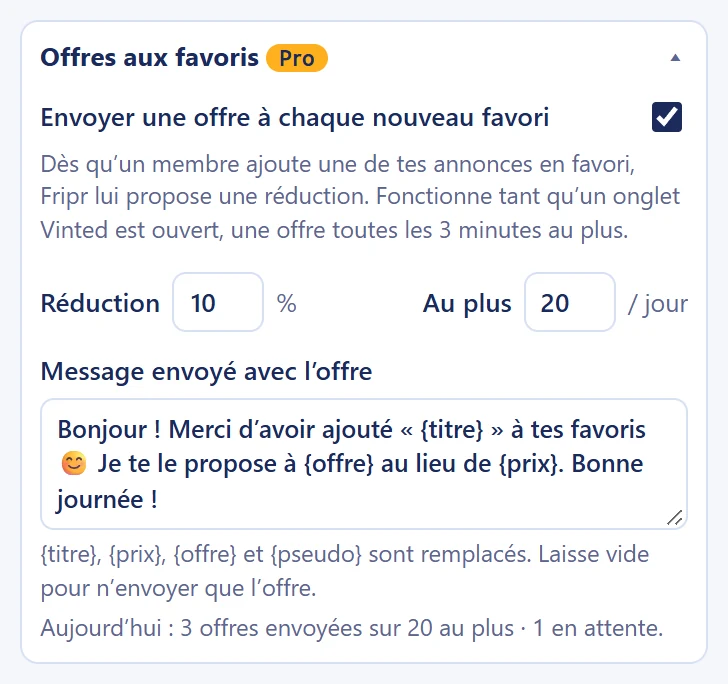
Good news: your listing appeals. A favourite is someone who’s hesitating, often about the price. The little nudge that works: offer them a discount of 5 to 15%, with a friendly note. You can do it by hand from your notifications, or let Fripr send an offer for every new favourite (Pro and Boutique plans).
And above all, don’t repost a listing that has recent favourites: it would lose them all.
The checklist before you post
- Title: type + brand + detail + size.
- First photo in daylight, on a plain background, whole item.
- Every field filled in: precise category, brand, size, condition, colour, material.
- Measurements, material and flaws in the description.
- Price within the range of similar items.
- Item in season, or set aside until the right moment.
- Listing bumped regularly, unless it has favourites.
Read next
- Taking good photos for Vinted: Light, background, framing, flaws: 9 simple tips for photos that make buyers want to click, with nothing more than a phone.
- How to price your items on Vinted: Too expensive and nobody clicks; too cheap and you lose out. The 5-step method to set the right price, and know when to lower it.
- How to bump your Vinted listings: Why a listing sinks, and how to put it back at the top: by hand, with Vinted’s paid options, or automatically.